
iterAIte
IterAIte is a wearable lecture-recording device that thoughtfully integrates AI to support progressive learning. It reduces cognitive load, encourages active recall, and promotes more present, participatory classrooms. Student responses provide valuable insights, helping teachers reflect and adapt the curriculum to better align with individual learning needs and interests.

Timeline
12 weeks, Fall 2023
Team
Tzu-Yun Huang
Ann Mulgrew
Manqing Yu
Tracy Yu
Tools
Figma
Miro
Physical Prototyping Tools
Role
UX Researcher
Designer
Fabricator
Project Context
City of Bridges High School is a project-based school; they do not have a published curriculum. Each class is improvised based on students' interests, therefore, it's difficult for educators to keep track of what is discussed in class. How might we help teachers reflect on the curriculum, it's delivery, and the on-the-fly adaptations that worked well during class to track for future use? Conversely, what might be manageable ways for students to provide meaningful and productive feedback on the learning experience to help iterate the curriculum?
01 Design Problem
At progressive schools like City of Bridges, student-led learning makes it hard to capture key moments or balance note-taking and participation. Teachers build custom curricula from varied resources, but managing them, aligning to standards, and tracking what works is time-consuming and difficult in a busy classroom.
DESIGN OPPORTUNITY
As teachers deliver the curriculum, certain aspects work well for some students and not as well for others. Keeping track of curricular insights and receiving student responses are crucial to creating a productive classroom environment and curriculum.
Student voice is important in the curriculum development process in order to align content with student interests.
HOW MIGHT WE...
-
Efficiently collect, synthesize and present classroom insights for teachers to better evaluate the curriculum and align with student interest?
-
Provide a channel for students to provide specific, constructive feedback on the curriculum?
VISION STATEMENT
We’re creating a smart, wearable recorder that captures class moments, turns them into quick summaries, then deletes everything in 24 hours.
What are we making?
-
Teachers who want to evaluate effectiveness and interest in their curricular.
-
Students who want to review content from previous classes or provide input on the curriculum.
For who?
Support (not replace!) teacher-student interaction, minimize extra work for teachers, create space for all students to contribute, prioritize privacy with auto-deletion of recordings.
What do we promise?
LEARNING OUTCOME INDICATORS
We will know we are successful if...
Teachers and students frequently visit our platform; the summaries and insights help teachers make positive curricular changes and provide students with a greater voice in their education by giving them more opportunities to express their opinions and give specific, constructive feedback.
-
For implementation: frequency and convenience of use
-
For education: increased course quality, high efficiency in iteration; students’ involvement in the curriculum design and learning
02 RESEARCH & SYNTHESIS
PROCESS
The entire design process is divided into 6 main steps, 4 of which are research and synthesis-specific.
01
Subject Matter Expert Interviews
Get more information on the context in which our design brief sits plus knowledge from experts on their own experiences!
02
Contextual Inquiry
Learn more about CoBHS by getting involved in their classes, interview teachers, experience the community first hand!
03
Youth Focus Group
Interact with students of various years and academic pursuitsCoBHS, know more about each student and their perspectives!
04
Design Probes
Learn more about the student life & find more design potential design opportunities and or considerations.
05
Storyboard Speed Dating
Present our initial set of ideas to students and teachers from CoBHS and see how they react and respond.
06
Researching Existing Tech
Discover what kinds of devices that already exist and what features we could take and reapply to our design.
SUBJECT MATTER EXPERT (SME) INTERVIEWS
To begin, all students in the class completed a discovery interview with a subject matter expert. The four that we found particularly relevant to our design research process were the interviews with Patrick Cooper, Christie Lewis, Talia Stol, and Elias Bartlett.
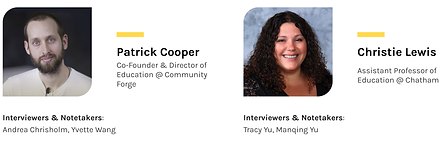
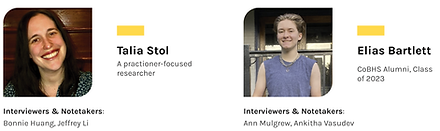

Interview synthesis and key findings

Interview synthesis and key findings

Interview synthesis and key findings
Interview synthesis and key findings
CONTEXTUAL INQUIRY
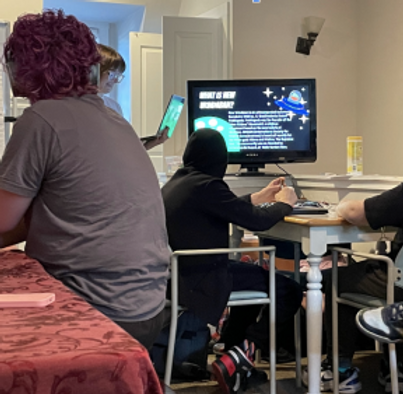
We completed a contextual inquiry that involved us visiting the CoBHS twice: once for Tim's class and once for Randy's class. Tim and Randy are both experienced teachers at the City of Bridges High School.

Tim's Classroom Observations & Interview
Method rationale:
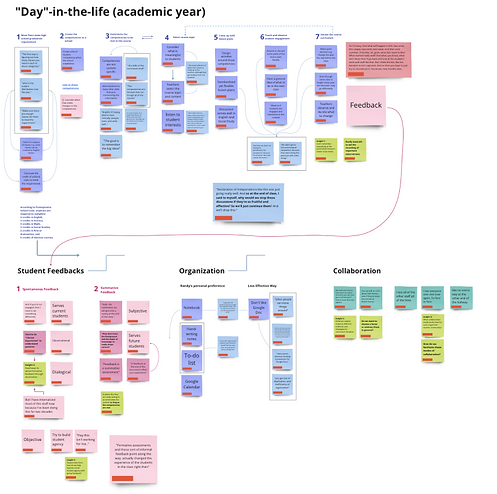
AEIOU was used to draw connections, relationships, and inferences between the 5 factors. The "Day in the life model" helps us identify problems in a structured sequences of an end-to-end class experience without missing important components of a classroom experience.
Synthesis model:
AEIOU + Day in the life
Research method:
Fly-on-the-wall
Guiding questions:
1. What are the interactions and behaviors between students, teachers, and tehnologies in relationship to the curriulum and how it is being delivered?
2. What are students' level of interest and engagement in the delivered curriculum?
Class info:
10th grade | 12 students | US history
Tim's classroom


Key Findings
Productivity & Distractions
Around half of the classroom time was spent on discussing off-topic content.
Understanding content:
A lot of the content is presented through discussions.
Question & Direction
HMW make the classroom environment more productive? HMW limit distractions and sidetracked conversations?
How can a discussion-based curriculum accomodate visual learners and more introverted students?
Teacher delivery & encouragement:
We notied that some students may not be as interested in the course content as others and that students in the back did not participate.
HMW encourage teachers to reflect on teaching methods that allow for all students to participate? Can we cretae classroom experiences that do not only rely on verbal communication but maybe something more visual?
Randy's Classroom Observations & Interview
Method rationale:
AEIOU was used to draw connections, relationships, and inferences between the 5 factors. The "Day in the life model" helps us identify problems in a structured sequences of an end-to-end class experience without missing important components of a classroom experience.
Synthesis model:
AEIOU + Day in the life
Research method:
Fly-on-the-wall
Guiding questions:
1. What are the interactions and behaviors between students, teachers, and tehnologies in relationship to the curriulum and how it is being delivered?
2. What are students' level of interest and engagement in the delivered curriculum?
Class info:
9th grade | 11 students | Dystopia in Literature
Randy's classroom
Key Findings
Strong Teacher-Student Bond
There were a lot of jokes and laughs in Randy's class, suggesting a close bond between students and teachers.
Question & Direction
Does being close on a personal level mean students are also comfortable discussing curriculum content and voicing concerns with teachers?
Confusion & Questions
When students voiced their confusion, the teacher doesn't always have enough time to fully address them or keep track of them.
How can we help teachers better understand students' concerns and foster a positive loop that encourages students to speak up?
SYNTHESIZED OBSERVATIONS: Shared insights from Randy & Tim.
Curriculum iteration is based on student engagement & interest.
-
Tim: "I want students to be interested in what they are learning"
-
Randy: Observe students' reactions and engagement in class to make on-the-fly decisions.
Strong Teacher Agency
-
CoBHS teachers don't teach based on an established curriculum. Both Randy and Tim practice quick decision making (eg they may change the class plan during class sessions).
Emphasis on discussion and real-world application.
-
Students discuss real-world issues to connect learning to lived experience. This approach is effective, but it can sometimes derail the lesson when the issues introduced are only loosely connected.
Customizing course content for the specific student group.
-
Tim: "I don't think you're gonna find any teacher who starts a class and has a culture where all students feel that level of safety."
-
Randy: "I get to know what group of kids they are over a few weeks into the school year."
TENSIONS: Derived from observations and interviews.
The value of student feedback VS the quality & motivation of feedback
Improvisation & internalized knowledge VS recordings to reflect on
Productivity VS distraction
Learners' diversity VS teacher's limited time & attention during class
YOUTH FOCUS GROUP
We visited CoBHS and were able to discuss with students what their thoughts were on the curriculum and other aspects of the school.


%201.png)
Focus Group Details
Guiding Questions:
-
Alignment of curriculum & learning goals: What are some of your learning goals? How does CoBHS help you achieve these goals of yours?
-
Engagement: In your opinion, what elements make courses engaging and interesting? What makes you lose interest?
-
Feedback loop: What would you do when you feel like the curriculum does not work for you or you would like to give feedback?
-
Technology: What kinds of technology do you use during class time?
Participants:
10-12th grade students | 6 students
Method:
Focus Group
In-progress affinity diagramming
Affinity Diagram
Inferred Insights
-
Application to futures: Student might not know how their personal development goals connect with their academic path. Consequently, students are unsure how the current classes they are taking are relevant to these goals.
-
Feedback & Student-teacher relationships:
-
Students' feedback and suggestions are mostly given during classroom discussions.
-
Students' personality traits and willingness would influence their contribution to the curriculum.
-
There is a lack of effective communication channels for more introverted students to communicate with teachers.
-
-
Technology use: Technology is less likely to be used to further students' learning. Technology is mainly used for communication and accessing information.
Summary
We created our own model to visualize the process of how the curriculum is formatted in CoBHS, showing how the school, teachers, and students contribute differently to the curriculum content. Among them, we have identified 5 design opportunities.

DESIGN PROBES
We got to know more about students and the CoBHS environment through our design probes.
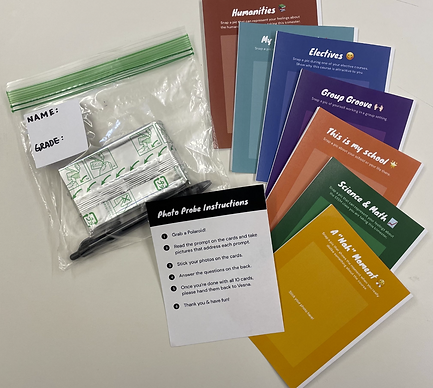
Design Probe Details
Guiding Question:
What are students' attitudes and emotions during and after class + their ideal relationship with peers and teachers?
Participants:
9th-12th grade students | 5 students
Method:
Polaroid photo discovery kit
Instructions given to students:
Students take 10 Polaroid photos with the given prompts and write down descriptions about the photos. Team members individually created inspiration artifacts based on their interpretation of the photos.

Results
We have collected 7 photovoice cards from our student participants (with photo and written notes). The photos captured individuals, groups, science and humanities classes, as well as space and environment.
Design Opportunities
1) Teachers need effective ways to observe the levels of student engagement in the classroom.
2) Teachers need efficient tools to aid the recording of important observations.
3) Multiple channels are needed for students with different dispositions to communicate their feedback.
4) Design an opportunity for both teachers and students to actively engage in the iterative process while ensuring the visibility of students' contributions.
5) Teachers crave to capture the cues and direct discussions toward constructive ideas for iteration.
03 USER TESTING
PROCESS
Based on our design probe results, we individually brainstormed design concepts that respond to. when creating these ideas, we kept not only the design probes in mind, but also our earlier conversations with our SMEs, Randy and Tim, and Contextual Inquiry.
01
Subject Matter Expert Interviews
Get more information on the context in which our design brief sits plus knowledge from experts on their own experiences!
02
Contextual Inquiry
Learn more about CoBHS by getting involved in their classes, interview teachers, experience the community first hand!
03
Youth Focus Group
Interact with students of various years and academic pursuitsCoBHS, know more about each student and their perspectives!
04
Design Probes
Learn more about the student life & find more design potential design opportunities and or considerations.
05
Storyboard Speed Dating
Present our initial set of ideas to students and teachers from CoBHS and see how they react and respond.
06
Researching Existing Tech
Discover what kinds of devices that already exist and what features we could take and reapply to our design.
Prior to beginning the speed dating session, each teammate developed 5 storyboards (with 20 ideas combined) inspired by our design probe responses, earlier conversations, and studies. We met as a team to pick our top 7 concepts and refined the storyboards to share with the students.
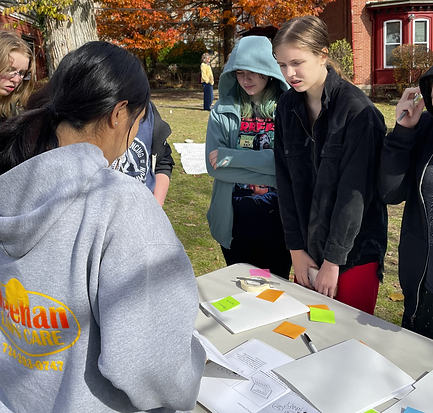
Storyboard Testing
Guiding Questions:
-
What are your initial thoughts?
-
Any concerns, opportunities, or synergies we might’ve missed? What stands out as most promising, and how might we refine or build on it?
-
Have you seen anything similar elsewhere?
Participants:
5 groups of COBHS student & teachers (~10 people per group)
10 min for each group
Method:
Focus group, speed-dating 7 storyboards
Recognized Limitations & Constraints:
Having 7 storyboards to review left little time to introduce and discuss each one, leading to feedback that may have skewed toward certain ideas due to uneven time distribution.

Teacher-based concept
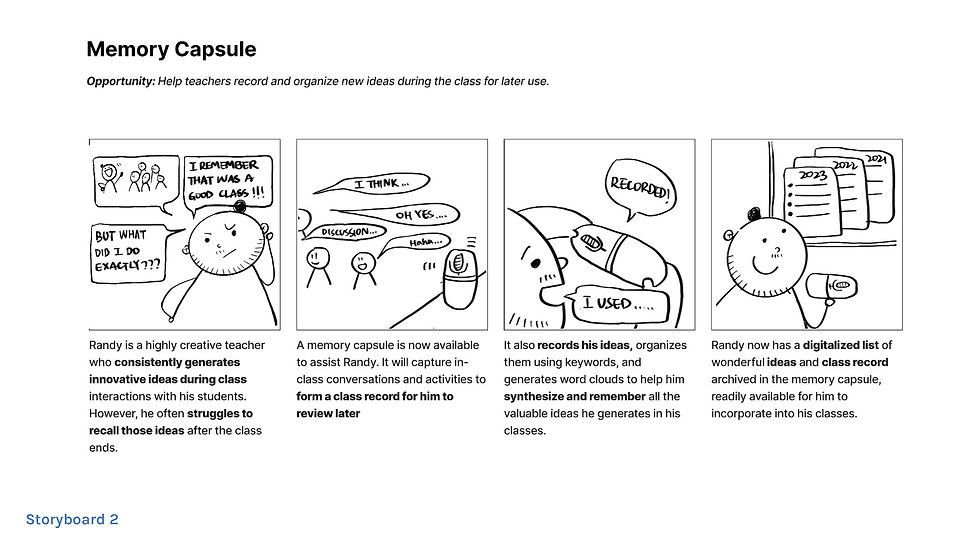
Teacher-based concept

Student-based concept
Teacher-based concept
Scoping & Refining our Design Opportunity
During our storyboard sessions, students strongly expressed a desire to be more involved in the curriculum design process. While this theme had surfaced earlier, it became especially prominent during the speed-dating sessions. Since our original prompt didn’t address this need, we recognized the importance of pivoting and reframing the problem to better reflect student voices—a crucial consideration at City of Bridges High School, where learning is largely driven by student interests.
REFRAMING OUR STORYBOARDS
After redefining our design opportunity, we revisited and reframed our storyboards based on the feedback from the speed-dating sessions. The first set focused on our teacher evaluation device concept. We noticed that students were most excited by ideas that allowed them to participate directly in the process. In response, we reimagined the reaction device in two directions: one maintaining the original cube format, and another as a written feedback toolkit.

Reframed Idea #1: Teacher Evaluation Device

Reframed Idea #1: Teacher Evaluation Device
Reframed Idea #1: Teacher Evaluation Device
Live Reactions:
-
Why: Students often hesitate to express confusion in class; physicality helps bridge that gap.
How: Buttons or small gadgets capture anonymous reactions in real time.
Impact: Promotes honest, in-the-moment feedback—especially for quieter students
Written Feedback:
-
Why: There’s a need for engaging, ongoing feedback beyond the moment.
How: A physical kit encourages students to share thoughts creatively and reflectively.
Impact: Supports continuous, hands-on expression aligned with the school’s learning philosophy.
The second set of reframed storyboards focused on our voice AI assistant. Students shared concerns that the assistant felt disruptive and intrusive—potentially distracting from learning and raising privacy issues. In response, we repositioned the AI as a silent, supportive presence rather than a controlling one. It now sits passively in the classroom during lessons, with an added “logistics mode” that allows students to interact with it outside of class time, building comfort and familiarity.

Reframed Idea #2: Recording Device

Reframed Idea #2: Recording Device
Reframed Idea #2: Recording Device
AI Device Recording Mode:
-
Why: Teachers often forget improvised changes made during class.
How: AI recognizes the teacher’s voice, capturing keywords and generating a summary of class discussions.
Impact: Helps teachers reflect on class dynamics and refine their teaching strategies.
AI Device Logistical Mode:
-
Why: Students worry about falling behind due to absences or distractions.
How: Absent students can ask the AI for a summary of missed content.
Impact: Provides a consistent, low-friction way to catch up—reducing dependence on peers.
LITERATURE & PROJECT REFERENCES
We did some secondary research to discover what technologies already exist that attempt to resolve our problem or a similar classroom problem. We also wanted to determine if te capabilities of this AI device that we are proposing will be feasible (if tecnology is advanced enough for what we want to do).
01 Class InSight
02 Harkness Teaching Tools
03 Humane AI Pin
This study explores how smart classrooms can sense in-class activity and support novice instructors through feedback. While the concept aligns with our design direction, the key challenge lies in determining the right level of detail to share with teachers.

During our interview with Randy, he mentioned using the Harkness tools to track student in-class engagement and quality of discussions. This pre-established method prompted us to think how AI and language processing can achieve better outcomes with the similar concept.

The latest release of Human’s AI pin inspired us to think about the possibility of using wearables and natural interactions for teachers to record classroom statistics with the most intuitive interaction with technology.

04 Design
DIGITAL PROTOTYPE
Interact with our prototype here!
Our digital prototype has two users: students and teachers.


Student-facing prototype.


Teacher-facing prototype.
PHYSICAL PROTOTYPE
Our prototype is a compact, 1.5”x1.5” device designed to be non-intrusive and teacher-only. It clips onto clothing and records only when a teacher is speaking, ensuring student-to-student conversations remain private.

Other features:
-
Clip: There is a clip in the back for teachers to easily place on their clothing.
-
On/Off Button: There is only one button on the entire device. Once pressed on to recording mode, a light will shine to reassure the teacher that the device is on and recording.
For Teachers
-
Clarify what gets recorded and how summaries are used.
-
Device records only the teacher’s voice and pauses when unclear.
-
Support both immediate feedback and end-of-semester reflection.
For Students
Use a reaction device to log feelings without disrupting class.
Access to summaries is earned through an “exit ticket” for assessment.
Design must consider absent and quiet students.
In general...
The AI should be portable, non-disruptive, and enhance interaction.
Prioritize privacy and consent; provide tutorials to build understanding of the AI’s role.
DESIGN CONSTRAINTS & CLARIFICATIONS
EXPERIENCE MAP
Our experience map captures the full journey of interacting with our product, incorporating insights from teachers and two types of student voices—talkative and quieter students. It helped us align needs, identify gaps, and understand our design’s impact across all touchpoints.
The map includes four layers:
-
Emotional states of students and teachers
-
Key actions across time (including absent/present students)
-
Interaction channels (AI device, face-to-face, web, phone, reaction tools, location)
-
Backstage support required to keep the system running
.png)
05 Reflections
We got some great insights from our presentation and demo - super helpful for moving forward!
What Went Well
We explored AI in education even when stakeholder input was mixed. We focused on what mattered, let go of extras, and grounding our pitch in a real recording helped sell the idea. We also took feedback seriously and used it to iterate
What Needs Work
Our design was a bit too ambitious for the time we had (we spent most of our time on the research phase, resulting in a design that was not high fidelity). In the future, we’ll narrow scope earlier, test more with users, and keep a closer eye on potential risks like privacy or negative social impacts.
What's Next
We want to build a full user flow with features like learning goals, trackable course iterations, and flexible ways for teachers to collect learning evidence—guided by learning science and gentle nudges.
05-291 Learning Media Design; taught by Marti Louw